

On this page, you can explore three inspiration events that demonstrate different ways of setting up an event website in Conference Manager.
Each example is based on a different website theme — Theme A, Theme B, and Theme C — and showcases how layout, structure, and visual presentation can vary while still using the same underlying Conference Manager functionality.
You are welcome to register for the inspiration events to experience the full flow, from browsing the website and programme to completing the registration and receiving the confirmation communication.
The examples are designed to give you inspiration for how you might combine themes, structure, and visual elements when creating your own event website, depending on your needs, content, and brand.
Theme A
This inspiration website demonstrates how a large-scale event can be presented using Theme A as the starting point, with support for both in-person and online participation as well as optional additional sessions.
The example focuses on presenting a comprehensive programme with detailed session descriptions, allowing visitors to gain a clear overview of the event content before registering. Particular emphasis has been placed on showcasing the speakers, including background information that helps visitors understand who will be contributing to the event.
Speaker images are used as interactive elements. Clicking on a speaker image leads to a dedicated page with additional information about that speaker. These pages are not visible in the main navigation, allowing more in-depth content to be provided without adding complexity to the navigation structure.
The website also includes feedback and testimonials from participants of previous editions, offering insight into earlier experiences and perspectives.
In this example, visual design choices are used to support the structure and guide visitors through the content towards registration. These choices are independent of the selected theme and can be adapted across different themes.
Theme B

In this example, the front page presents different workshop topics, each linking to a dedicated page on the website with dates to choose from. The button next to each date leads to its own participant category within the same event in Conference Manager.
All of the participant categories have been set up as hidden and access to each is handled through event code links that lead directly to the sign-up flow. These links are embedded in the website using the Website Designer, allowing participants to register for the selected workshop without navigating through a general sign-up page.
The sign-up page itself is hidden from the website navigation and can only be accessed via the event code links. This ensures that participants only see the workshop and date they have selected, while the organiser maintains a single, structured event setup with multiple workshop dates.
Theme C
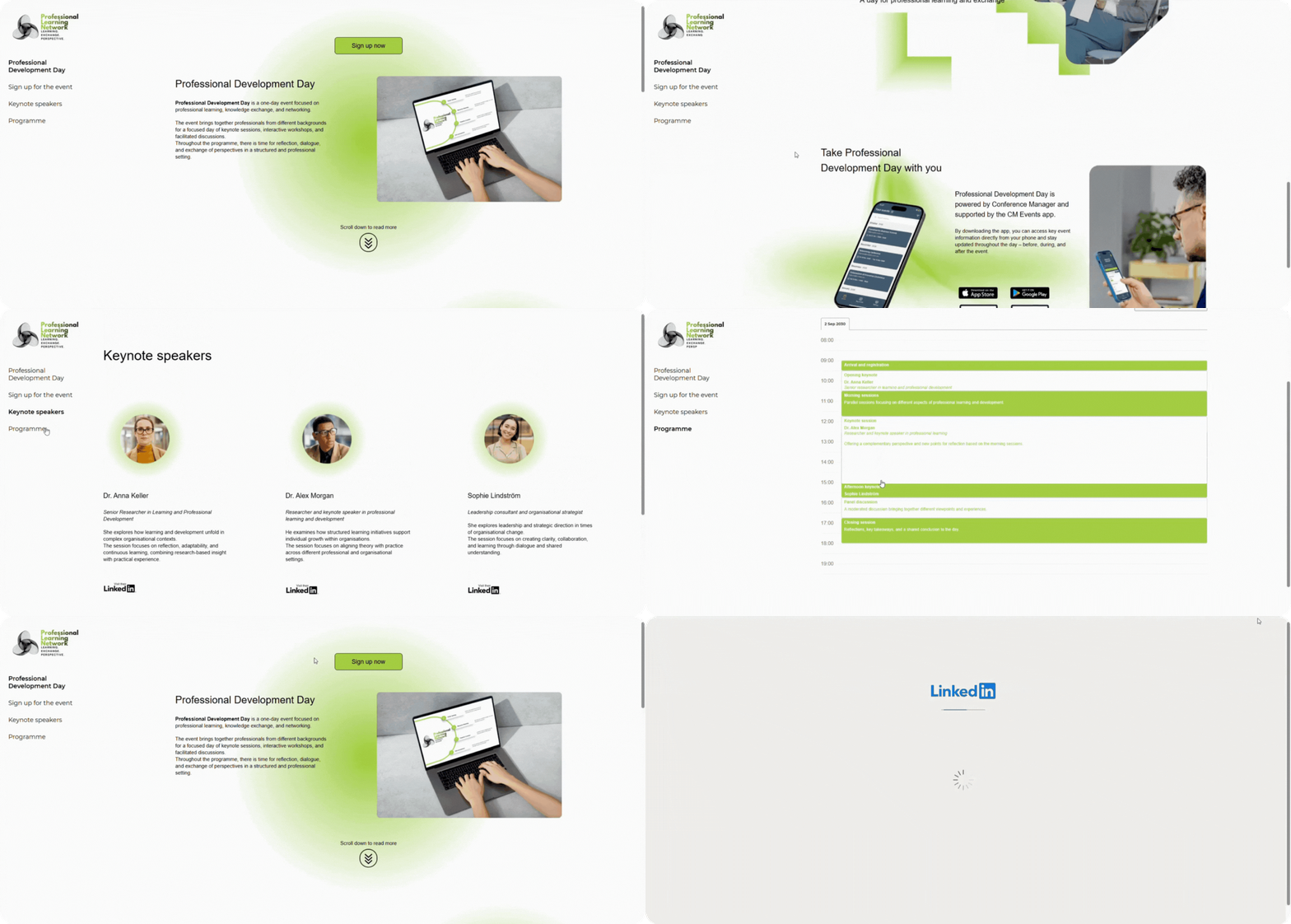
The focus of this example is on layout, structure, and visual consistency. Padding and spacing have been adjusted across the different elements to ensure clean alignment and a clear visual hierarchy throughout the website.
The navigation menu on the left is kept visible to provide access to key sections, while a prominent call-to-action button on the front page links directly to the sign-up page. A dedicated programme page has also been created, where the programme is pulled automatically from the event setup in Conference Manager and displayed on the website.
The visual design is based on a consistent use of green and white as the primary colours, which can easily be adapted to match your own brand identity. Dynamic elements have been added using animated images uploaded as GIF files, including animations in the logo and on the front page.
All graphics used in this example have been created in Canva and combined with standard Conference Manager functionality. This demonstrates how external design tools can be used alongside Conference Manager to enhance the visual expression of an event website, rather than relying on Conference Manager alone.
Images are also used as interactive elements, with links embedded directly in visuals — for example to LinkedIn profiles and to download the CM Events app.
The purpose of this example is to provide inspiration for how standard Conference Manager functionality can be combined with visual design choices and external design tools to create a clear, coherent, and engaging event website.
Want to learn more?
Watch our introduction video to see how the Website Designer works here, or read our step-by-step guide on how to add and manage elements in the Website Designer here.