



News
Stay up to date with the latest updates, guides and important changes in Conference Manager.
Customise columns and their order in lists
Choose which columns appear in your lists and in which order – the order is also used when exporting to Excel.
Customise columns and their order in lists
Choose which columns appear in your lists and in which order – the order is also used when exporting to Excel.
See the latest participant changes
Get a quick overview of recent participant changes directly from your event overview.
Multiple accommodation bookings now available
Participants can now book more than one accommodation in the same registration for different periods of the event.
Four new upgrades in Conference Manager
More control over website access, programme items and webinar links in Communication.
Wallet pass now available
Participants can now add their ticket to Apple Wallet or Google Wallet directly from the order confirmation.
New early bird feature
A new early bird feature lets you open and close participant categories automatically.
New shortcuts from the event overview
Open a filtered participant list directly from participant categories and selections in the event overview.
New WordPress event overview plugin
Display and customise Conference Manager events directly on your own WordPress website.
Registration Prefill is now available
Let participants start registration with selected details already filled in from your own system.
Small but helpful improvements in Conference Manager
Five smaller updates make it easier to manage access, contact participants, handle invoices and review registrations.
New start guide available
A new start guide is now available in CM Academy and takes you through the setup step by step.
New explainer videos available
New short explainer videos are now available in several Academy articles.
Push notifications now available in the CM Events app
Participants can receive reminders before an event starts or before important programme items.
Updated design of the Accommodation tab
The Accommodation tab has a cleaner layout and is easier to overview.
Select event category at creation
You must now select an event category when creating a new event.
Updated design of the Webinar tab
The Webinar tab has been updated, making key settings easier to find.
The CM Events app is getting an update
The CM Events app is getting a new design, smarter navigation and faster access to important information.
Updated design of the Website tab
The Website tab has been updated, so familiar functions are now presented in a clearer structure.
Two-factor now via authenticator app
Two-factor login now uses an authenticator app instead of SMS.
Customise columns and their order in lists
You can now choose which columns appear in your lists and arrange them in the order that works best for you.
Open Select columns to show or hide columns, then drag them into your preferred order.
Your chosen column order is also used when exporting to Excel, so you can prepare your lists before downloading them instead of rearranging the columns afterwards.
This functionality is available across the lists in Conference Manager, except for the order and invoice lists.
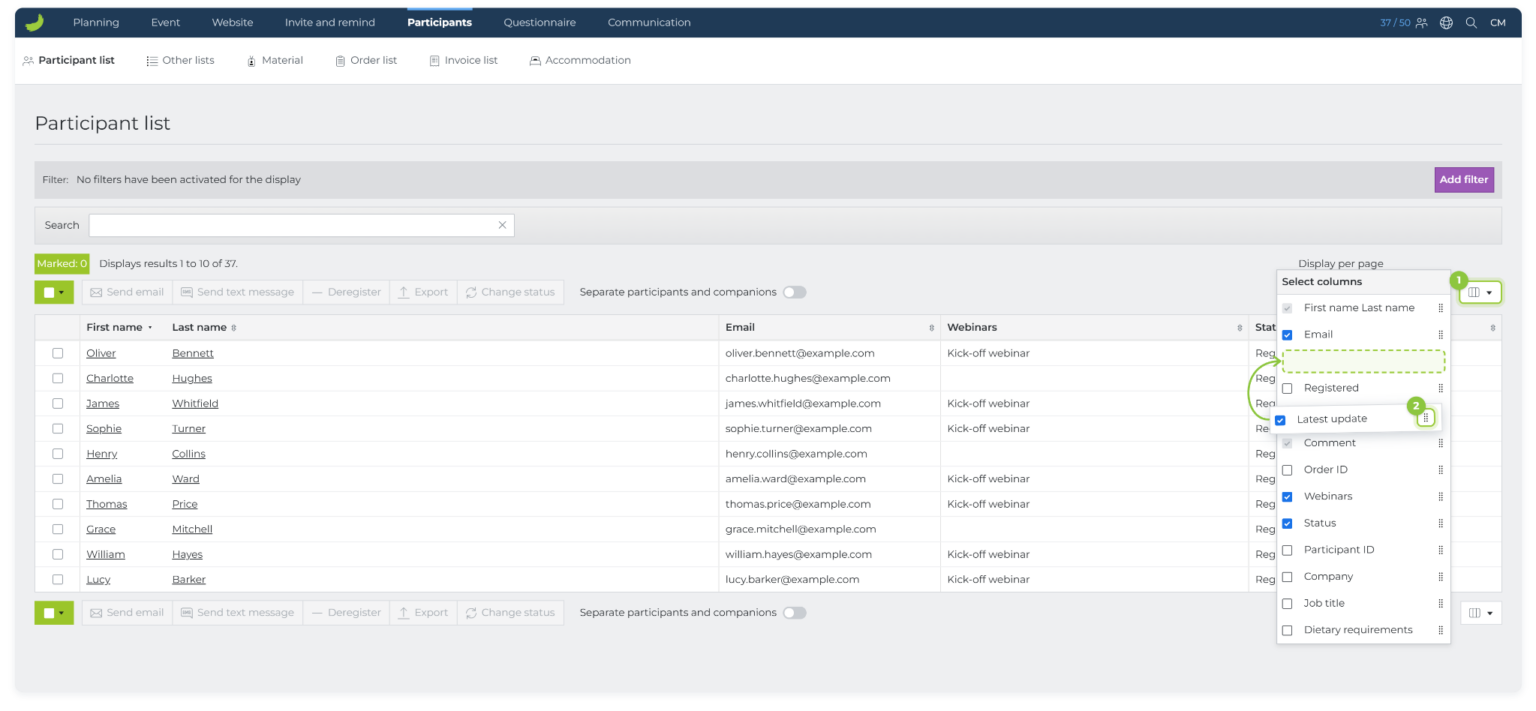 Learn how to customise columns and their order
See the latest participant changes
You can now get a quick overview of recent participant changes directly from your event overview.
Under The event, you’ll find Latest changes, where you can review recent participant-related activity. You can also use Hide my changes to focus on changes made by others.
The overview focuses on participant-related changes, not changes to your event setup.
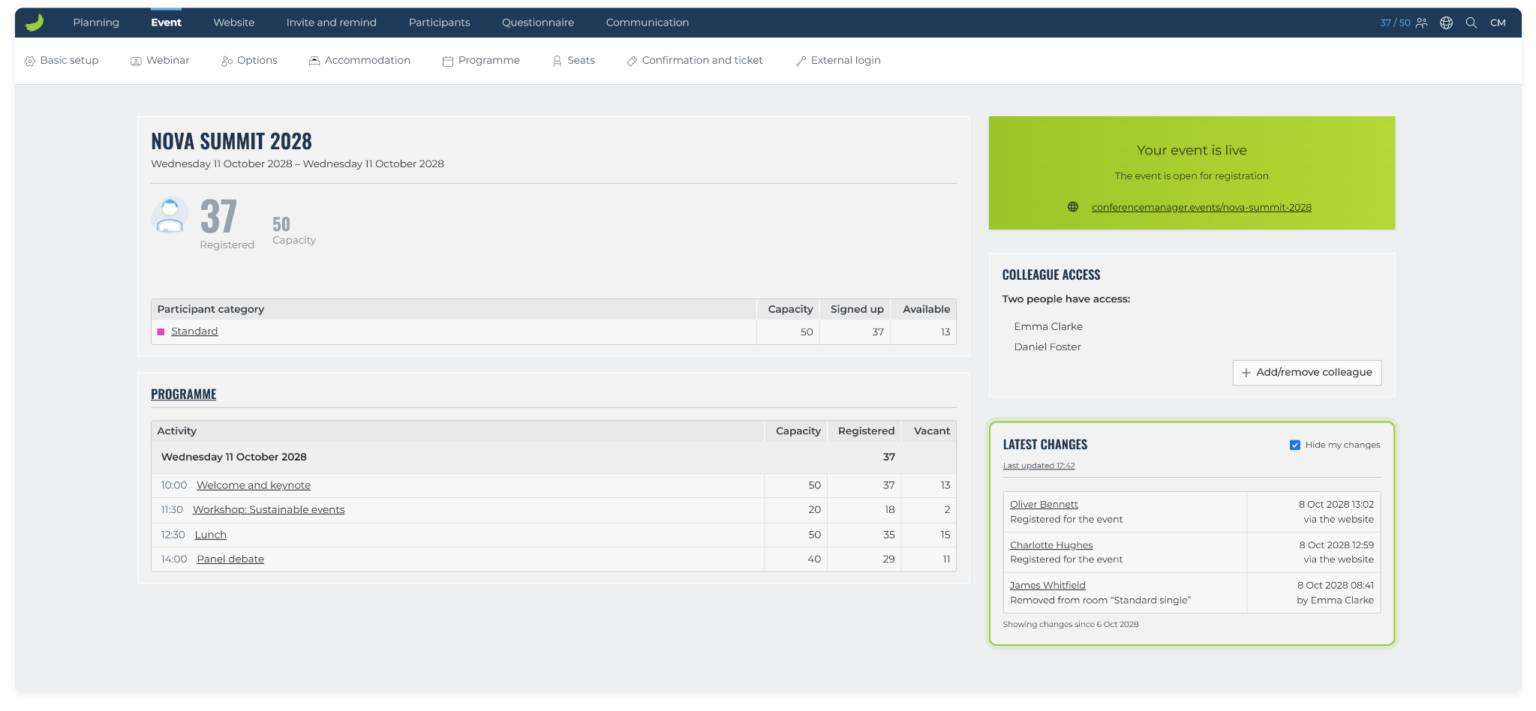 Learn how to view the latest participant changes
Multiple accommodation bookings now available
Participants can now book more than one accommodation in the same registration. This is useful when they need to stay in different rooms or hotels during different parts of their stay.
Enable Multiple accommodation bookings under The event → Accommodation. Each booking can have its own period. The periods cannot overlap, but one booking can end on the same date that another begins.
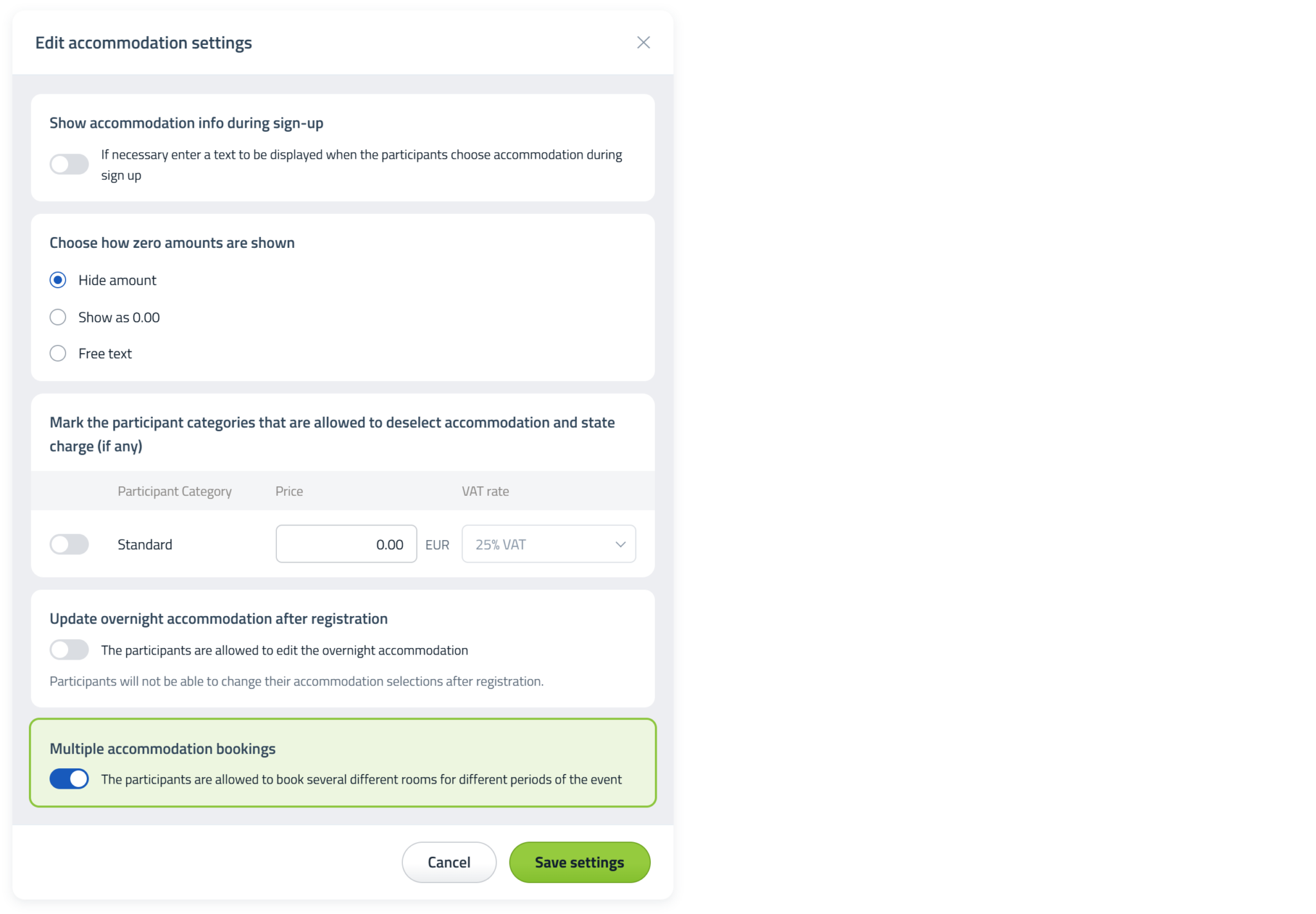 Learn how to allow multiple accommodation bookings
Four new upgrades in Conference Manager
We’ve added four new improvements to Conference Manager that give you more flexibility and make everyday event management even easier.
Restrict access to website pages
You can now restrict individual website pages to selected participant categories. Go to Website → Setup and activation, open Website Designer, click Pages in the left-hand menu, and then click the settings button (the gear icon) on the page you want to restrict to open the page settings.
Under Access to this page, choose whether the page should be visible only to invited and signed up participants or to participants only. You can then select the participant categories that should have access.
Choose an access level and then select the participant categories that should be able to see the page.
Please note: Access restrictions can be used on all website pages except the front page and the signup page.
Copy a programme item
You can now copy an existing programme item directly from the programme overview. Go to The event → Programme and use Copy on the programme item you want to reuse.

The Copy button is available directly on each programme item.
Choose whether a programme item is shown on the website
When creating or editing a programme item, you can now choose whether it should be displayed on the public website.
Use Display on public website when creating or editing a programme item.
Insert a participant’s unique webinar link in an email
When creating an email in Communication, you can now insert each participant’s unique webinar link directly into the message. Choose Insert link and then select Link to webinar.
Select Link to webinar in the Insert link dialog. Each participant receives their own unique webinar link.
Wallet pass now available
Wallet pass is now available in Conference Manager. Once enabled, participants can save their ticket to Apple Wallet or Google Wallet and keep it ready on their phone for check-in.
Activate Wallet pass
Enable Wallet pass under The event → Confirmation and ticket → Wallet Pass.
 Planning
The event
Website
Invite and remind
Participants
Questionnaire
Communication
Planning
The event
Website
Invite and remind
Participants
Questionnaire
Communication

Wallet option in the order confirmation
When Wallet pass is enabled, the order confirmation includes a Wallet section. Participants can continue from there on their phone and add the ticket to their phone wallet.
Fri 10 Nov 10:00 → Tue 14 Nov 16:00


Add the ticket to your phone wallet
After a few quick steps on the phone, the ticket is saved in the wallet. The Wallet pass contains the event name, date and QR code, so it is easy to open and present at check-in.
New early bird feature
You can now set an activation date and a deactivation date for each participant category. The category will automatically become available and close again at the selected dates and times.
This makes it easier to offer time-limited categories and prices. For example, you can create an Early bird category and a Standard category, then set the standard category to open when the early bird category closes.
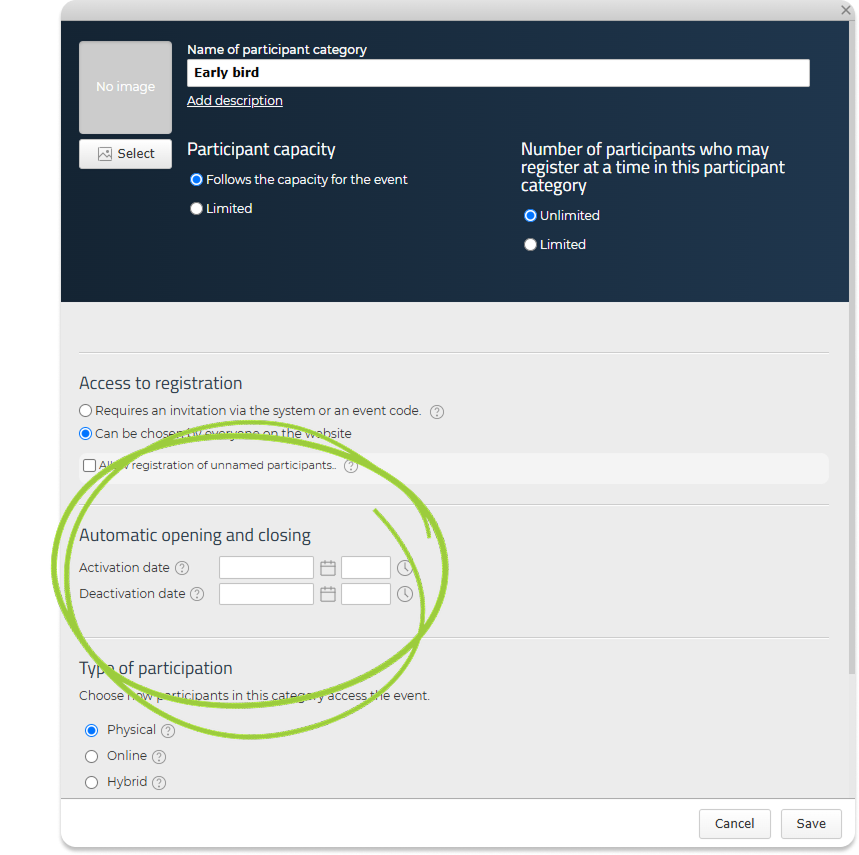 Learn how to set up an early bird participant category
New shortcuts from the event overview
The event overview now gives you faster access to filtered participant lists. Open it by clicking The event in the main menu without selecting one of the tabs underneath. From here, you can click a participant category or one of the available selections to open the relevant list with the filter already applied.
Move the pointer over a section of the doughnut chart to see the participant category and the number of registered participants. Click the section to open the participant list, automatically filtered by that category.
You can also click a choice, hotel room or programme activity shown further down the overview. Conference Manager opens the relevant list and applies the selected filter automatically, giving you faster access to specific groups of participants.
Try the interactive preview below to see how the shortcuts work. Hover over a section of the doughnut chart to view its details, or click it to open the filtered participant list. You can also click a choice, hotel room or programme activity further down.
Experience Exchange Workshop
Saturday 19 May 2029 – Saturday 19 May 2029
| Participant category | Capacity | Signed up | Available |
|---|---|---|---|
| ∞ | 54 | ∞ | |
| ∞ | 11 | ∞ | |
| ∞ | 22 | ∞ |
Option
Event choices| Choices | Capacity | Number selected | Available |
|---|---|---|---|
| 80 | 46 | 34 | |
| 40 | 31 | 9 |
Accommodation
Accommodation deselected: 59| Date | Rooms | Booked | Beds | Available |
|---|---|---|---|---|
| 19 May | 50 | 28 | Single | 22 |
Programme
| Activity | Capacity | Registered | Vacant |
|---|---|---|---|
| Saturday 19 May 2029 09:00 | |||
| 13:00 | 50 | 35 | 15 |
Participant list
| First name | Last name |
|---|
New WordPress event overview plugin
You can now display Conference Manager events directly on your own WordPress website with the WordPress event overview plugin.
Choose which information visitors can see and customise colours, card styles and layouts to fit your website. The overview retrieves event data through the Conference Manager API and updates automatically every 15 minutes.
Please note: The plugin requires a self-hosted WordPress website and a Conference Manager API user.
Registration Prefill is now available
Registration Prefill lets participants start registration with selected information already filled in from your own system.
This creates a smoother registration flow and reduces the need to export and import participant data manually.
Small but helpful improvements in Conference Manager
We have introduced several smaller improvements across Conference Manager. The updates make it easier to manage access, contact the right participants, handle invoices and keep participant lists organised.
Search for colleagues when managing access
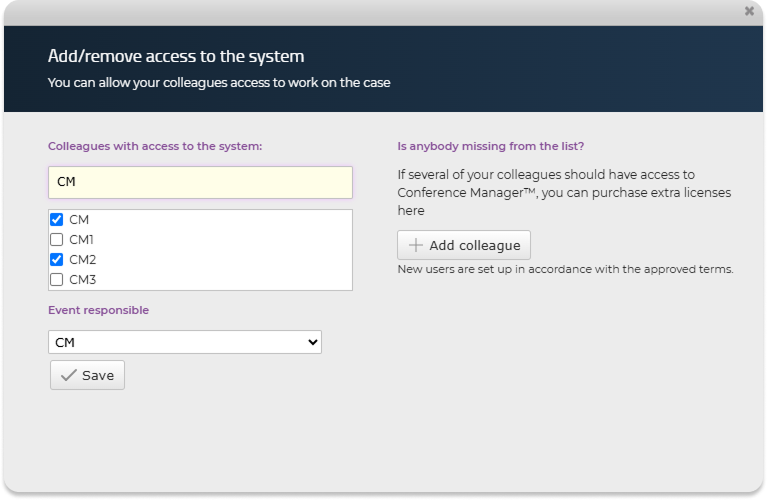
A search field has been added to the dialogue for adding or removing colleagues’ access to an event.
This makes it easier to find the right colleague, particularly if your organisation has many Conference Manager users.
 Read how to add a colleague to your event
Find participants who have not selected any options
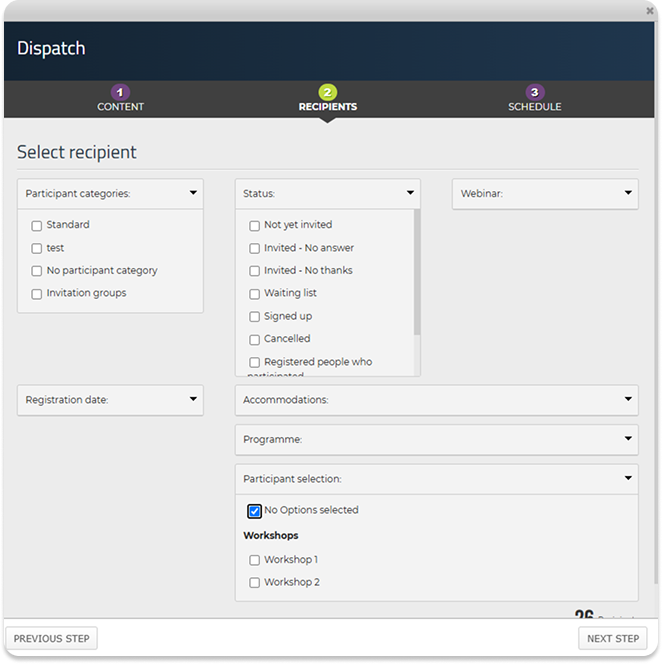
A new No options selected filter is now available when sending emails.
The filter makes it easy to identify participants who have not yet selected any options for the event. You can then contact them directly, for example by sending a reminder asking them to make their selections.
 Read more about emails and dispatches in the Start guide
Insert the event name into meeting request subject lines
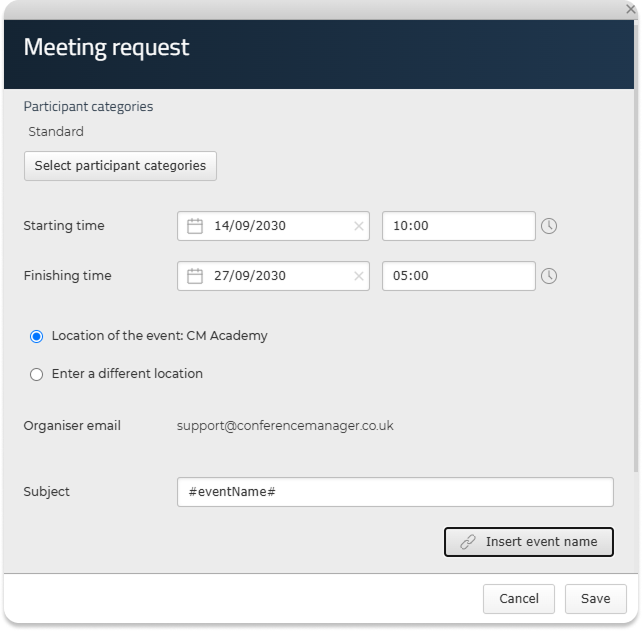
You can now insert the event name into the subject line of a meeting request by entering #EventName# or clicking Insert event name.
This is particularly useful when copying an event, as the event name in the meeting request subject line will automatically update to match the new event.
Remember: Always review your meeting requests when copying an event to ensure that the subject line and all other content are still correct.
 Read more about meeting requests in Conference Manager
Only allow e-invoicing
If you use Conference Manager to handle invoicing, you can now choose to allow e-invoicing as the only invoice dispatch method and disable delivery by email.
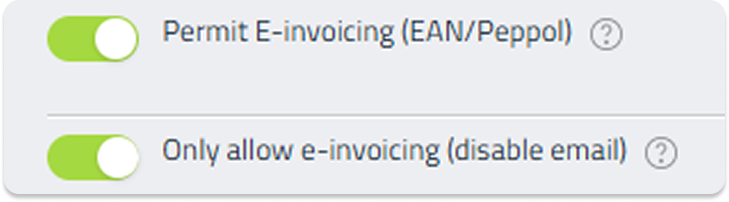
Go to The event → Confirmation and ticket → Invoice. Scroll down and enable Permit E-invoicing (EAN/Peppol), fill in the invoice issuer information and click Save.
A new setting called Only allow e-invoicing (disable email) will then appear below. Enable this setting if invoices should only be sent by e-invoicing.
 Read how to activate e-invoicing
Review duplicate email addresses in one place
A new Duplicate emails tab is now available under Other lists.
The overview shows duplicate email addresses across the lists in your event, including information such as the participant’s name, order ID and the list on which the registration appears.
Click a participant’s name to open and review their personal details. From here, you can delete the registration if necessary.
 Read how to find and review duplicate email addresses
New start guide available
A new Get started guide is now available in CM Academy. It helps new users go through the most important areas in Conference Manager.
The guide covers the basic setup step by step, from logging in and creating your event to configuring the main areas in Conference Manager.
Go to guideNew explainer videos available
New short explainer videos are now available in several Academy articles. The videos show key functions step by step and give you a quick overview before you start setting things up.
More videos are added continuously, so keep an eye on the Academy.
Push notifications now available in the CM Events app
The CM Events app now supports push notifications. Participants can choose to receive reminders before an event starts.
This helps participants stay on schedule and avoid missing important sessions or event information.
Read articleUpdated design of the Accommodation tab
The Accommodation tab has a cleaner layout and is easier to overview.
All familiar functions remain, but the structure has been improved to give you a clearer overview of hotels, rooms and settings.
Read articleSelect event category at creation
You must now select an event category when creating a new event.
The category helps structure events and can later be relevant for overviews, reporting or internal workflows.
Read articleUpdated design of the Webinar tab
The Webinar tab has been updated, making key settings easier to find.
All familiar functions remain, but the structure is clearer, making webinars easier to set up and manage.
Read articleThe CM Events app is getting an update
The CM Events app is getting a new design, smarter navigation and faster access to important information.
The update is designed to make the app easier for participants to use, with easier access to tickets, programme information and practical details.
Read articleUpdated design of the Website tab
The Website tab has been updated, so familiar functions are now presented in a clearer structure.
The updated layout makes it easier to manage the event website and find relevant settings faster.
Read articleTwo-factor now via authenticator app
Two-factor login now uses an authenticator app instead of SMS.
When logging in, you use a 6-digit code from the authenticator app. This makes login more secure and independent of SMS delivery.
Read article


