To keep your account secure, Conference Manager uses two-factor authentication (2FA) when there is a potential risk — for example, when we detect that you are logging in from an unknown IP address.
Two-factor authentication means you’ll be asked to confirm your identity using two steps: your password and a second method — a 6-digit code from an authenticator app.
Watch a quick explainer
What is an authenticator app?
An authenticator app is a free app for your phone that generates a temporary 6-digit code. This code refreshes every 30 seconds and helps ensure that only you can access your account.
Once the app is linked to your Conference Manager profile, it works automatically in the background — no internet or mobile signal required.
You can use any common authenticator app, such as Google Authenticator or Microsoft Authenticator.
How to set it up in Conference Manager
You can edit your two-factor authentication from your personal user settings.
Open your user profile
Log in to Conference Manager.
Click your name in the top right corner and select Update user profile.
Click Edit under Two factor protection.
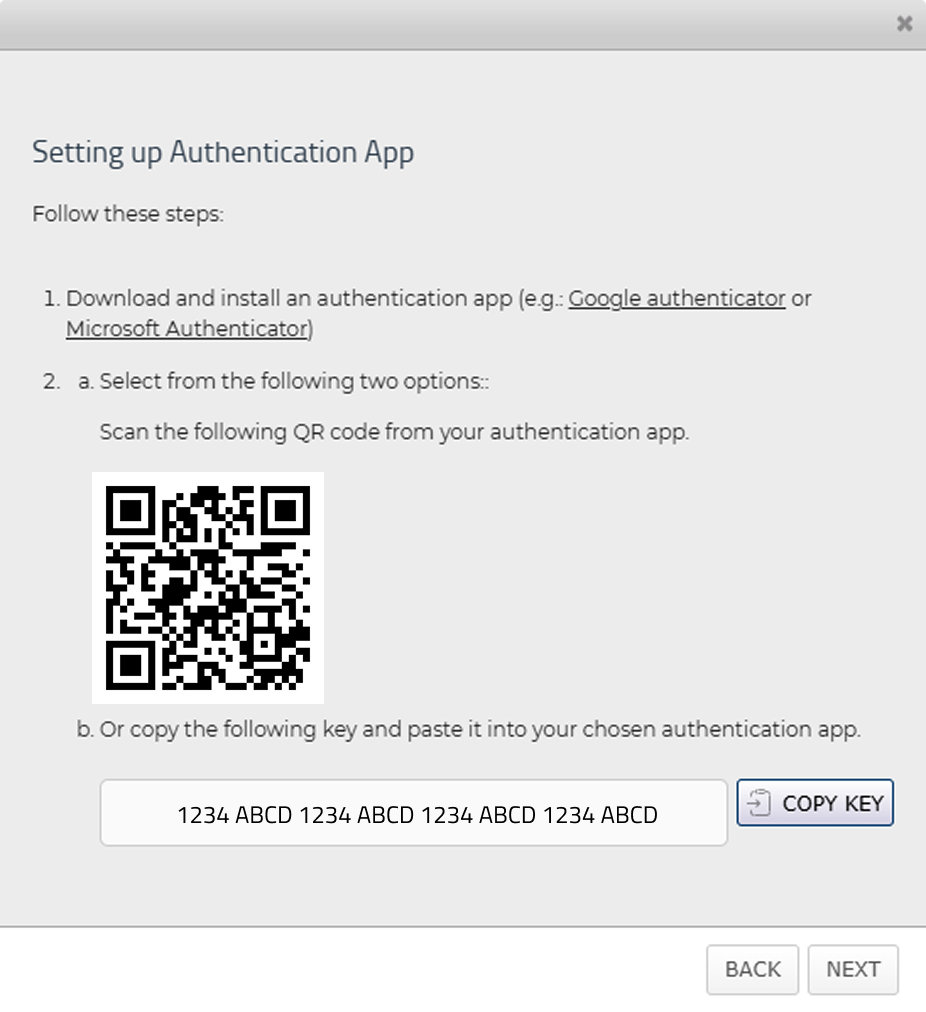
Link your authenticator app
Open your authenticator app on your phone and scan the QR code or type the code shown on the screen. These two options should both be available in your authenticator app.
Enter the 6-digit code in Conference Manager generated by the app to confirm.
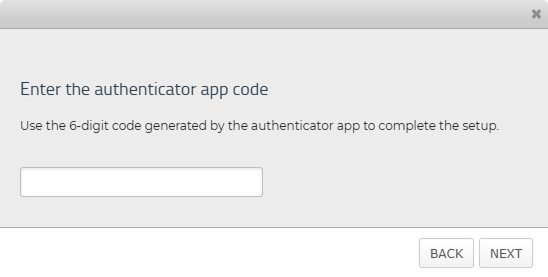
Two-factor authentication is now enabled on your account.
Going forward, when you log in to Conference Manager from an unknown IP address, you’ll be asked to verify your login using the 6-digit code from your authenticator app.
If you switch phones later, remember to update the app connection under your profile settings in Conference Manager.